How to print your Google Calendar here
- Fastest: paste your calendar’s link. In Google Calendar, open Settings, click your calendar under Settings for my calendars, and copy Secret address in iCal format (under Integrate calendar). Paste it in the box above and click Load. Keep that address private.
- Or export a file: gear icon › Settings › Import & export › Export, then drop the .zip above (no need to unzip). Use this to print several calendars at once. Step-by-step export guide.
- Pick a layout and dates, check the preview, then press Print or save as PDF.
Jump to a layout
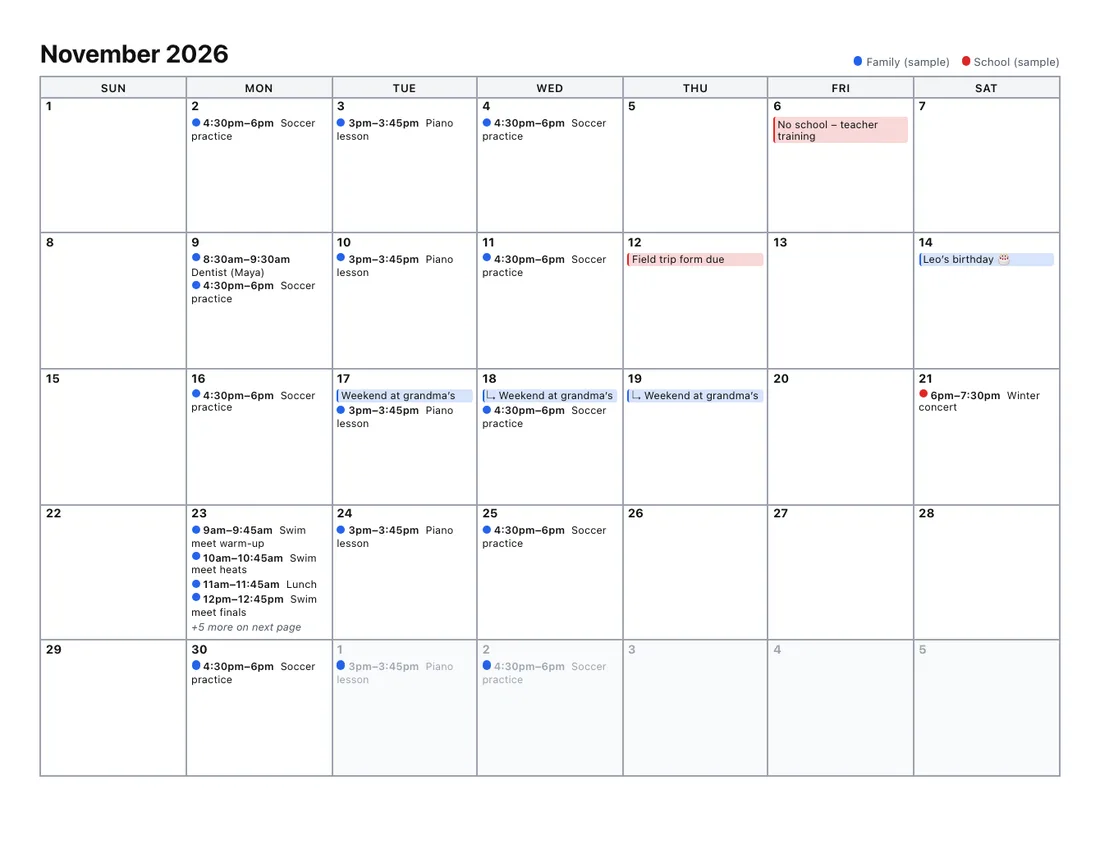
- Month view: Every event shown; busy days continue on a marked page.
- Week view: Hours down the side, or a week planner with details.
- Year view: 12 months on one page, or a linear wall planner.
- List view: Agenda list, page per day, or daily planner.
- Design gallery: Six designs for a calendar that looks good on the wall.
What this does that Google’s print doesn’t
Google Calendar’s print is fine for a quick copy of what’s on screen. It falls short in a few specific ways, which is exactly where this tool helps:
| You want | Google Calendar print | This tool |
|---|---|---|
| A month grid with every event visible | Busy days are cramped into a fixed box | Busy days continue on a marked page, or the week grows |
| Event descriptions | Only in Schedule (list) view | Week, day and agenda layouts |
| Several months or a whole year at once | One date range of the current view | Up to 3 years in one print; year overview page |
| Calendars from different accounts on one page | Only calendars in the same account | Any mix of Google, Outlook, Apple or school .ics files |
| Large print | Font size setting | Large-print layouts sized for reading at a distance |
| Printing from a phone | No print option in the app | Works in a phone browser if you have the file |
If you only need what Google already prints, its built-in option is quicker. Our guide to printing Google Calendar covers both ways.
Tips for a clean printout
- In the print dialog, turn off Headers and footers so the browser doesn’t add the page address and date.
- Landscape suits the month grid and week planner; portrait suits the agenda and day pages.
- For a fridge or wall calendar, try Large print with Locations off.
- Black and white saves colour ink; each calendar is still shown in its own shade.